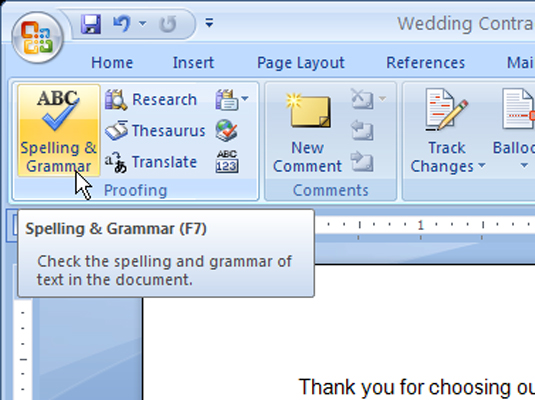
- On the Review tab, click the Spelling & Grammar button.
 The Spelling and Grammar dialog box opens and takes you to the first item that Word 2007 thinks is misspelled.
 - Tell Word 2007 how to treat each item it finds misspelled.
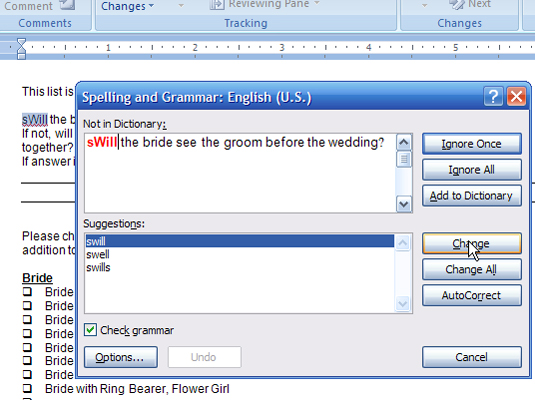 Choose from these actions:
- Ignore Once: Click this button to tell Word 2007 that this entry is fine.
- Ignore All: Click this button to tell Word 2007 that every same spelling of this word is fine.
- Add to Dictionary: Click this button to have Word 2007 add the word to its internal dictionary.
- Change: First choose (click) a word from the Suggestions panel at the bottom of the dialog box. Then click this button to have Word 2007 insert the corrected word.
- Change All: This works like Change but changes every instance of the misspelling in the document. You must choose a spelling from the Suggestions panel.
- AutoCorrect: Clicking this button tells Word 2007 to insert the top-ranked word listed in the Suggestions panel.
- Click Close to exit the dialog box.
Click the Change All button of the spell checker only if you’re completely positive that you want a global spelling change made. Otherwise, you run the risk of introducing more spelling errors.

Walang komento:
Mag-post ng isang Komento